Install
The installer detects your hardware, picks a backend (Vulkan, ROCm,
CUDA, or CPU), writes the systemd units, drops the hal0 CLI on
PATH, and brings up the API plus a prewired OpenWebUI tab. It’s
idempotent. Re-runs touch nothing in /etc/hal0/.
The one-liner
Section titled “The one-liner”curl -fsSL https://hal0.dev/install.sh | bashOn Proxmox VE (one line)
Section titled “On Proxmox VE (one line)”If you run Proxmox, you don’t have to create the container by hand. From the pve host shell as root:
bash -c "$(curl -fsSL https://raw.githubusercontent.com/Hal0ai/hal0/main/scripts/proxmox-ve/hal0.sh)"That spins up an unprivileged Debian 13 LXC (next free CTID, 4 cores,
8 GB RAM, 20 GB disk, DHCP on the first vmbr*), installs cosign,
then runs the standard hal0 bootstrap inside it. Pass --advanced for
whiptail prompts on every parameter; or override via env vars (CTID,
HOSTNAME, RAM_MB, DISK_GB, STORAGE, NET_CONFIG, …). The
script lives at
scripts/proxmox-ve/hal0.sh.
Deployment shapes
Section titled “Deployment shapes”hal0 doesn’t care which slice of your homelab it runs on, as long as the kernel speaks systemd and podman. Three shapes worth naming:
- Bare-metal Linux. The simplest case.
hal0-api,hal0-openwebui, and the per-slot podman containers all live on the host. - VM. Works if you give it enough RAM and pass the GPU through. Eats more host memory than an LXC for the same workload.
- Privileged LXC on Proxmox (recommended for homelabs). GPU and
NPU passthrough via
dev0–dev3+ cgroup allows. The Strix Halo iGPU + XDNA recipe is privileged + AppArmor unconfined; AMD discrete- ROCm needs
/dev/kfdand/dev/dri/*passed through. CPU-only is the one shape that runs fine unprivileged. The unified-memory bar in the dashboard surfaces the LXC’s cgroup slice and, when you wire in aPVEAuditortoken via/etc/hal0/proxmox.json, the physical host total plus other tenants. hal0 knows it isn’t the only thing on the box.
- ROCm needs
What you’ll see after install
Section titled “What you’ll see after install”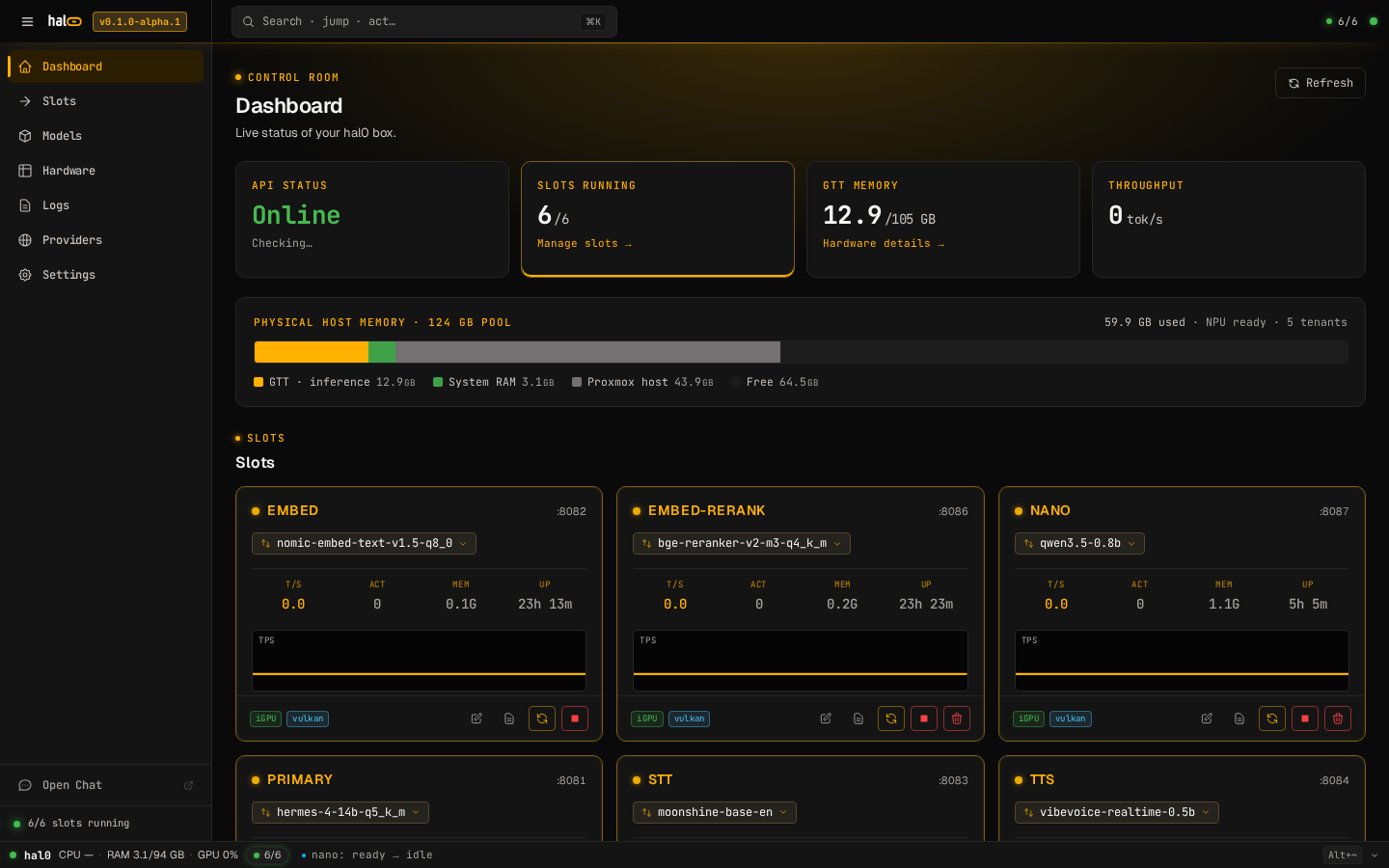
Dashboard at /. Four KPIs across the top (API, Slots, Memory,
Throughput), the unified-memory bar, then the slot grid. On a fresh
install the slots sit offline until the first-run wizard or the CLI
loads one.
Prerequisites
Section titled “Prerequisites”-
Linux with systemd. Tested on Arch, CachyOS, Fedora, and Ubuntu 22.04+. macOS and Windows are not in scope for v1.
-
x86_64. ARM is not currently supported.
-
Podman reachable. Slot inference containers run under podman. The installer checks podman availability before doing anything destructive.
-
At least 20 GB free under
/var/lib. Models, registry, and OpenWebUI state land there. Override via--models-dir=/pathif you’d rather point at a NAS mount or an existing model store. -
Ports
8080and3001free. Override withHAL0_PORTandHAL0_OPENWEBUI_PORTif you need different ones.
What the installer does
Section titled “What the installer does”-
Pre-flight checks. Verifies systemd, x86_64, podman, free space, and free ports. Bails before touching anything if a check fails. Re-runnable on its own as
hal0 doctor. -
Hardware probe. Detects GPU, NPU, and unified-memory pools. Writes
/etc/hal0/hardware.json. Drives the default backends and the slot-fit warnings in the dashboard. -
FHS-aligned layout. Creates the tree the rest of hal0 expects:
/usr/lib/hal0/current/— versioned code, atomic symlink swapped byhal0 update/etc/hal0/— config (hal0.toml,api.env,openwebui.env, slot skeletons), preserved across updates/var/lib/hal0/— models, registry, slot state, OpenWebUI state
-
Config defaults. Writes
hal0.tomland the five built-in slot skeletons (primary,embed,stt,tts,img). The hardware recommender renders aprimary.tomlwithenabled = falseso you pull a model and flip it on yourself. Existing files are never overwritten on re-run. -
systemd units. Drops
hal0-api.serviceandhal0-openwebui.serviceinto/etc/systemd/system/. Thehal0-slot@.servicetemplate is written separately for per-slot podman containers. Reloads the daemon, enables and starts the API plus OpenWebUI. -
hal0on PATH. Symlinks/usr/local/bin/hal0→${VENV_DIR}/bin/hal0so the CLI works without sourcing anything.uninstall.shremoves the symlink. -
Finish. Prints reachability URLs, streams a live “hello” through the freshly-spawned slot, and (if
qrencodeis on PATH) drops an ANSI QR pointing at the dashboard.
Memory accounting on Proxmox
Section titled “Memory accounting on Proxmox”
The memory bar reads physical-host totals when it can, instead of
the LXC’s cgroup slice in isolation. On a Proxmox LXC, hand the
dashboard a read-only PVEAuditor API token plus endpoint in Settings
→ Proxmox integration and the bar adds a muted “Proxmox host” segment
for other tenants, ZFS ARC, and kernel pressure. Token and endpoint
live 0600 at /etc/hal0/proxmox.json and the API redacts the value
on read and in logs. Bare-metal installs leave the panel off and the
bar stays scoped to the local box. Segment order is System RAM |
GTT (iGPU inference) | Proxmox host pressure | Free.
Overrides
Section titled “Overrides”Every knob is an environment variable. Pass them on the same line as the installer:
HAL0_PORT=9090 HAL0_OPENWEBUI_PORT=9091 \ curl -fsSL https://hal0.dev/install.sh | bash| Variable | Default | Purpose |
|---|---|---|
HAL0_PREFIX | /usr/lib/hal0 | Install prefix |
HAL0_PORT | 8080 | API + dashboard port |
HAL0_OPENWEBUI_PORT | 3001 | OpenWebUI port |
HAL0_USER | hal0 | Service user |
HAL0_PYTHON | python3 | Python interpreter |
HAL0_NO_PROBE | unset | Skip the hardware probe |
HAL0_AUTO_PULL | 0 | Pre-pull toolbox images on install |
HAL0_TOOLBOX_IMAGE_VULKAN | repo default | Override Vulkan toolbox tag |
HAL0_TOOLBOX_IMAGE_ROCM | repo default | Override ROCm toolbox tag |
HAL0_HOME=$PWD/.hal0 relocates the whole tree under your working
directory and skips the systemd path entirely. Useful for dev installs.
install.sh --models-dir=/srv/models points the install at an
existing model store at provision time. Resolution order: explicit
flag, then HAL0_MODELS_DIR, then an interactive prompt on a tty,
then /var/lib/hal0/models. The path is persisted as
[models].pull_root and auto-included in [models].roots so a fresh
install scans the existing tree on first boot.
Authentication & HTTPS
Section titled “Authentication & HTTPS”hal0-api binds 0.0.0.0:8080 with no built-in auth or TLS. On a
trusted home LAN behind your Traefik this is the correct default.
For exposed deployments, put a reverse proxy (Traefik, nginx,
Cloudflare Tunnel) in front and handle auth and TLS there.
See Authentication & Security for recommended
patterns including WebSocket passthrough and the MCP transport
allowlists.
From a clone
Section titled “From a clone”git clone https://github.com/hal0ai/hal0cd hal0sudo bash installer/install.shThe script in the repo is the same one the URL serves.
Verifying the install
Section titled “Verifying the install”hal0 statusSystem summary plus the state of every slot. A healthy install shows
the five built-in slots offline; the
first-run wizard lights up
primary for you.
curl http://localhost:8080/v1/modelsReturns data: [] until you’ve assigned a model to a slot.
hal0 doctorRe-runs the pre-flight pack against the live host. Handy after a kernel upgrade, a podman update, or whenever something feels off.
Next steps
Section titled “Next steps”Uninstalling
Section titled “Uninstalling”sudo bash /usr/lib/hal0/current/installer/uninstall.shStops the services, removes the unit files, and (with --keep-data)
leaves config and models in place. Without --keep-data it also
clears /etc/hal0 and /var/lib/hal0.